Historical agent workspace: v1.0.9
The screenshot shows a local project tree and the Files, Terminal, Planner, Memory and Checkpoints tabs. The top-right Write OFF control belongs to the editor/Planner surface; it does not describe every terminal permission.
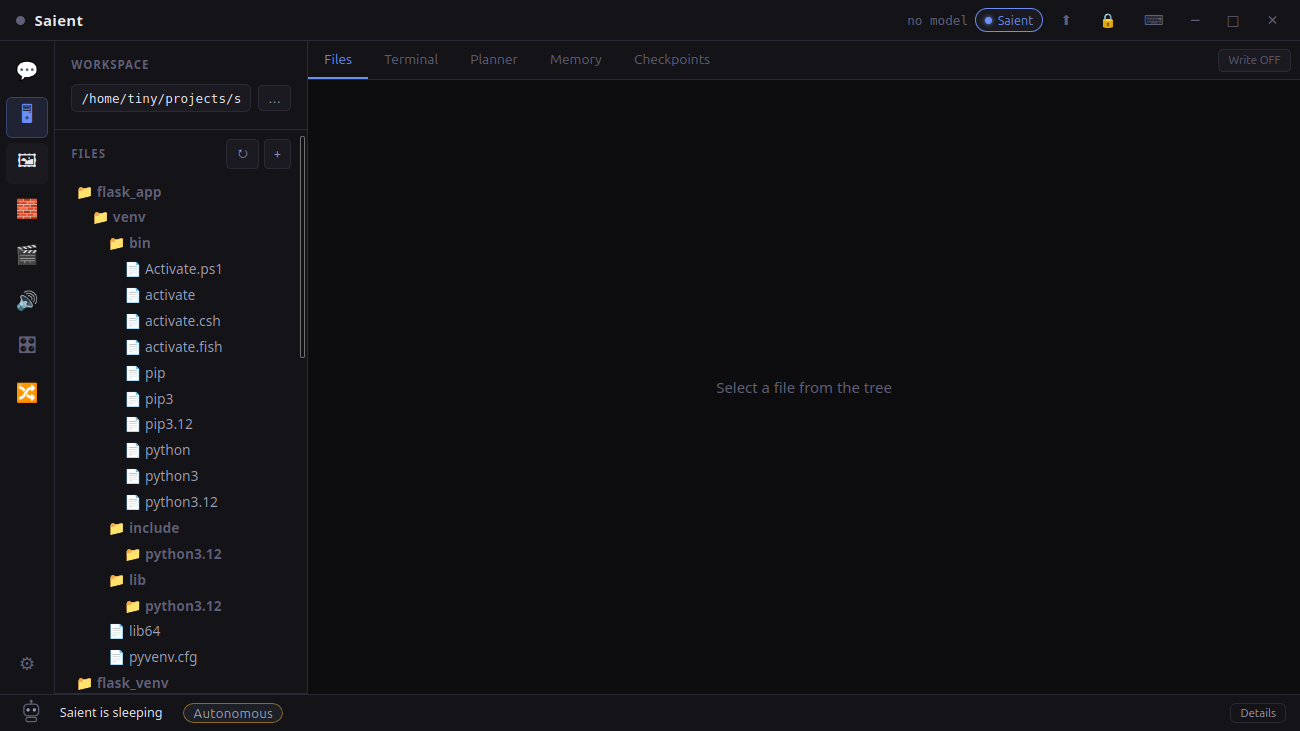
Saient agent workspace
Captured from the installed desktop app. The project path is local; no cloud IDE is shown or implied.
What Saient supplies vs what the host model supplies
| Layer | Responsibility |
|---|---|
| Local LLM host | Produces candidate plans, tool-call content, explanations and other generated text. Different models or sampling settings can change those proposals. |
| Saient state | Stores drives/goals, persistent agent state, episodic/semantic/procedural memory, checkpoints and provenance. |
| Saient control | Arbitrates proposals, selects actions, runs the autonomous loop, handles refusal/repetition recovery and records verification feedback. |
| Saient desktop bridge | Connects the runtime to the chosen project, file tools, PTY terminal, permission controls and local model server. Host shell execution is not an OS sandbox. |
Three separate permission surfaces
- Planner and file editor: Write mode controls their write-capable operations. Planner checks actual command exits and declared result evidence; “Plan checks passed” is not independent proof that a coding goal is solved.
- Terminal agent: normal confirmations and
/yologovern its tool execution. Authorised commands run as your account; file-tool boundaries do not confine the shell. - Long Project: an opt-in saved-goal loop with its own write/shell permissions, time and call budgets, pause/resume state and explicit acceptance command. It does not inherit Planner Write mode or
/yolo.
Give it a verifiable local task
- Select a project. Saient scopes file tools and project state to the chosen workspace.
- Load a local GGUF model. Choose a model that can follow structured instructions and tool schemas.
- State the goal and checks. Name the expected outcome, constraints and command/test that will prove completion.
- Grant only needed authority. Choose permissions for the surface you are using. Inspect proposed commands; keep backups before authorising modifications.
- Review evidence. Inspect changed files, terminal output, verification feedback, memory/provenance and checkpoints.
The agent uses the local LLM you load
The desktop agent uses the local GGUF engine. Check the beta manifest requirements for the packaged engine and hardware scope. Model choice, prompt format, controller behavior and inference implementation all affect results; a larger model alone does not establish reliability.
What the dev.6 checks establish
A Qwen2.5 7B newline correction and a Qwen2.5-Coder 14B Long Project normalization task passed their checks and reached completion after controller fixes. These were individual trials, not a success-rate or speed benchmark.
Harder configuration work still failed on the tested local 14B in an independent control. Broad coding reliability and sustained unattended projects remain open.
Dev.6 regression and exact package-resource audits passed. A fresh-profile native smoke covered setup, terminal and a text workflow; it did not repeat image/video inference.
The v1.0.9 screenshot and August local-host smoke remain evidence of those older builds. They are not fresh dev.6 measurements.
Completion needs recorded work and the applicable checks. Failed, denied or interrupted checks cannot stand in for a pass. This reduces false success paths; it does not make any chosen checker a complete specification.
Continue from here
- Choose the dev.6 Linux beta or stable downloads.
- Choose and run a compatible local GGUF model.
- Saient setup, security and troubleshooting help.
- Read the full AI Agent Persistence research paper and evidence boundary.
- Saient release repository on GitHub.
- Compare Saient's task-focused approach with ComfyUI.
Use a local model with persistent agent machinery.
Saient is free and does not require a Saient licence or hosted inference key. You remain responsible for the project, model and permissions you select.