Choose a local model and start the server
This v1.0.4 screenshot shows three GGUF files discovered on disk, their sizes, GPU-layer and context controls, and the local Start server action.
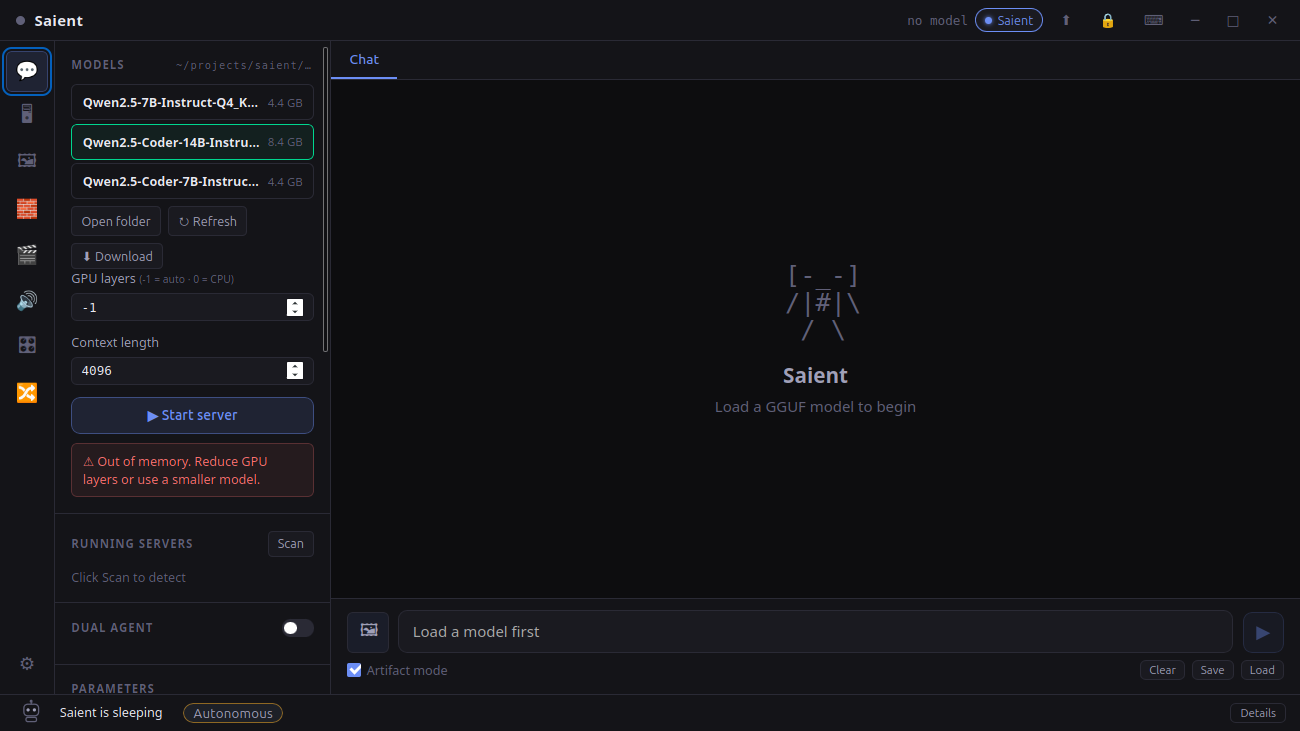
Saient local LLM screen
The listed 7B and 14B Qwen files were present on the test machine when this screenshot was captured.
Run a local LLM in four steps
- Install Saient. Fast setup is enough for chat and the agent; Full setup also installs image, video, TTS and LoRA dependencies.
- Add a GGUF. Use the built-in downloader or copy a
.gguffile into the displayed models folder. Public downloads need no Saient key; a gated third-party repository can still require its own terms/token. - Set memory controls. Use GPU layers
-1for the automatic/all-GPU path where supported, or reduce offload when VRAM is limited. Context length also consumes memory. - Start and chat. Select the model, start the local server and send a message. Saient also exposes an OpenAI-compatible local chat-completions endpoint for its own interface and local integrations.
Architectures and quantisations
The current GGUF metadata validator recognises these architecture identifiers:
llama, mistral, phi, qwen2, gemma, falcon and gpt-oss.
Q4_K, Q5_0/1, Q6_K, Q8_0, BF16, F16 and F32, including the project's gpt-oss MoE path.
How much RAM or VRAM?
- Start with the model file size. A 4.4 GB file cannot fit into less than 4.4 GB of combined storage and runtime memory; inference also needs KV cache and working buffers.
- Context costs memory. A larger context window increases KV-cache use, so a model that loads at 4K context may fail at a much larger setting.
- NVIDIA GPU: fastest supported desktop path. GPU layers can be reduced if the whole model does not fit in VRAM.
- CPU: supported. Use enough system RAM for the model plus runtime overhead and expect lower token speed.
A live local inference response
On 9 August 2026, the already-running Saient server on the development machine returned ok from its local health endpoint, identified its loaded model as Qwen2.5-Coder-14B-Instruct-Q4_K_M, and answered a deterministic request with:
This is a functionality check, not a speed or quality benchmark. No benchmark number is inferred from it.
Continue from here
- Download Saient v1.0.9 for Debian/Ubuntu amd64 or the Windows x64 CPU-LLM test build, or follow model setup help.
- Saient release repository on GitHub.
- Read about the open-source Quartz engine and inspect SaientAI/saient-quartz on GitHub. Quartz is Saient's public mobile/native engine; the desktop v1.0.9 GGUF server described on this page is tinyq4.
- Use the loaded LLM with the Saient agent.
- For images or video, follow the SDXL guide or the Wan guide.
Keep the prompt and inference loop local.
Saient is free and the local server needs no hosted-inference key. You still choose and comply with each third-party model's licence.