Short answer: Saient provides a task-focused desktop screen around local Diffusers image pipelines. Point it at a compatible model, load it once, choose prompt and generation settings, then generate without sending the prompt or image to a hosted inference provider.
Real interface
The SDXL controls in Saient
This screenshot was captured from the current v1.0.4 desktop application. It shows the model and LoRA pickers, device selection, scheduler, steps, CFG, seed and image-size controls.
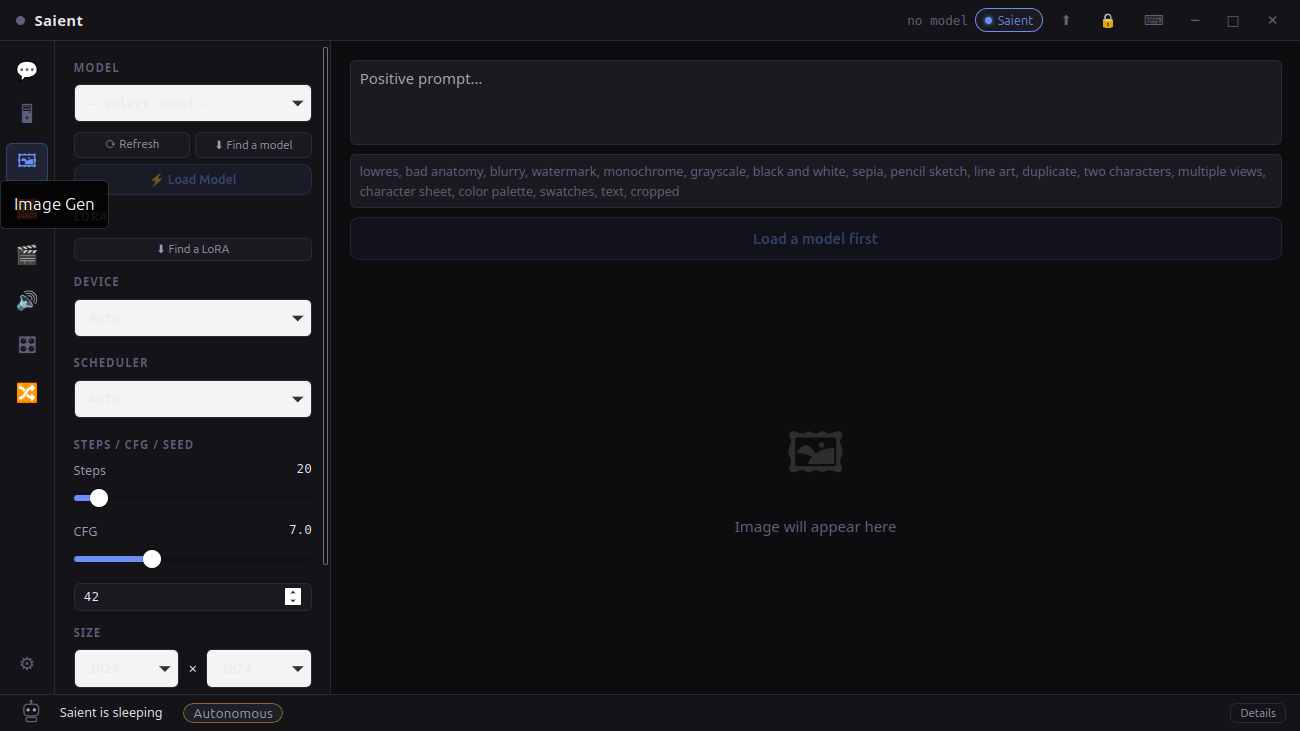
Saient Image Gen, v1.0.4
A screenshot of the shipped application, not a mock-up.
Setup
Run SDXL locally in four steps
- Install Saient. Use the current Debian/Ubuntu amd64 package from the download section. Choose Full setup so Saient creates its managed Python environment for image tools.
- Add a model. In Image Gen choose Find a model, or place a local Diffusers model directory in Saient's image-model folder. Compatible single-file SDXL and SD1.5
.safetensors/.ckptcheckpoints are also handled when a local base configuration is available. - Load it. Select Auto, CUDA or CPU. Auto uses CUDA when a suitable NVIDIA device has enough free memory for the loader; otherwise it selects CPU.
- Generate. Enter positive and negative prompts, then set resolution, steps, CFG and seed. The result appears in the app and can be saved locally.
Compatibility
Supported image model routes
| Model family | Verified implementation | Important boundary |
|---|---|---|
| SDXL | Diffusers directories and compatible single-file checkpoints; optional LoRA; selectable schedulers. | A single-file checkpoint needs a local SDXL base config. Model licences remain separate from Saient. |
| SDXL Turbo | Detected from pipeline/scheduler configuration and given low-step defaults. | Do not use ordinary SDXL step/CFG expectations for a distilled model. |
| SD1.5 | Diffusers directories and compatible single-file checkpoints. | Use model-appropriate resolution rather than assuming SDXL's 1024px default. |
| SD3 / SD3.5 | Local Diffusers directories with a dedicated loader; CUDA path quantises the transformer and T5 encoder to 4-bit. | Not presented here as an SDXL checkpoint. It is a separate architecture and can require much more storage and memory. |
Hardware
What hardware do you need?
- Current package: the audited SDXL route is Debian/Ubuntu amd64. A Windows x64 installer is available for testing, but this SDXL workflow has not yet passed an end-to-end Windows check.
- GPU: an NVIDIA CUDA GPU is recommended for useful generation speed. Saient's image loader considers CUDA in Auto mode when it sees at least 5 GB free, but that is a selection threshold, not a promise that every SDXL model or resolution fits in 5 GB.
- CPU: supported by the image pipeline, but substantially slower.
- Storage: allow space for the app's optional Python environment and each model. Full setup is approximately 6 GB before model weights; model sizes vary.
Unknown: Saient does not yet publish a measured minimum-VRAM matrix across every supported checkpoint, resolution and feature. Treat each model card and your chosen resolution as the final sizing authority.
Proof
A real image output and reproducible controls
The interface screenshot above proves the current application exposes the local image workflow. The embedded output below is an existing Saient project artefact, retained in both PNG and WebP form.

Local image-workflow example
1024 × 1024 output stored with the Saient website assets. The page does not claim that every model or prompt produces this style.
Downloads and documentation
Continue from here
Run the model on your hardware.
Saient is free to download and local inference has no Saient key gate. A third-party model host may still require accepting that model's terms or providing its own download token.