ComfyUI alternatives at a glance
People searching for a ComfyUI alternative are often solving different problems: avoiding node graphs, simplifying local Stable Diffusion setup, keeping inference offline, or combining image generation with video and language models. No single interface wins every category.
| Tool | Best fit | Main tradeoff |
|---|---|---|
| Saient | A local AI workspace with dedicated screens for SDXL images, Wan video, GGUF chat, an agent, TTS and LoRA tools. | Narrower model, extension and hardware coverage than ComfyUI. |
| Fooocus | Simplified, offline SDXL image generation with little manual tuning. | Image-focused; the official project is now in limited long-term support with bug fixes only. |
| AUTOMATIC1111 | An established Stable Diffusion web UI with txt2img, img2img, inpainting, training, scripts and extensions. | Its official installation still involves Python and Git, and it does not provide Saient's integrated local LLM and project-agent workspace. |
| SwarmUI | An approachable Generate tab with advanced access to raw Comfy workflows and multiple image/video backends. | Still uses a browser/server and backend ecosystem; Linux installation lists Python as a prerequisite. |
| ComfyUI | Maximum graph control, reusable workflows, custom nodes and broad creative-model support. | The node-based workflow and extension dependency surface are more machinery than some users want to operate. |
The distinctive Saient case: Fooocus, AUTOMATIC1111 and SwarmUI primarily approach the problem as image-generation interfaces. Saient is aimed at a wider local AI workspace where images, video, LLM chat and agent work are capabilities of the same desktop application.
Saient vs ComfyUI
| Need | Saient desktop | ComfyUI (official project) |
|---|---|---|
| Interface | Dedicated task screens with ordinary controls. | Modular node graph; also provides templates and App Mode. |
| Local LLM chat | Core GGUF chat screen using Saient's local tinyq4 server. | Official README lists text-generation model support through graph workflows. |
| Local coding/project agent | Built-in project files, PTY terminal, planner, memory, checkpoints and safety levels. | Not the product focus claimed by ComfyUI's official README. |
| Images | Focused SD1.5, SDXL/Turbo and SD3/3.5 routes. | Far broader official model list, graph composition, ControlNets, adapters, masks, compositing and custom nodes. |
| Video | Dedicated Wan and CogVideo workers with presets and memory handling. | Official support includes Wan, LTX-Video, HunyuanVideo, CogVideoX, Cosmos, Mochi and others. |
| Audio | Task-focused Kokoro English TTS screen. | Official project lists audio-generation and audio/video workflows. |
| Extensibility | Application source/runtime development; no user-facing node ecosystem is claimed. | Custom nodes, reusable subgraphs, templates and local API are core strengths. |
| Operating systems | Audited download: Debian/Ubuntu amd64. A Windows x64 CPU-LLM test installer is published, with Windows runtime and accelerator coverage still under test. | Official options cover Windows, Linux and macOS, with manual support across several GPU types. |
| Price/key for local app | Free; no Saient licence or inference API key. | Core is open source; official project also offers optional API nodes and a paid cloud product. |
Saient fits when you want
- A conventional desktop interface instead of constructing a node graph.
- GGUF chat and a local project agent in the same application as image/video tools.
- Wan presets, component-memory handling and storyboard controls exposed as a focused video screen.
- Kokoro TTS and SDXL LoRA controls without building a graph.
- A free local app with no Saient account or licence-key gate.
ComfyUI fits when you need
- Visual composition of model loaders, conditioning, samplers, masks, adapters and post-processing.
- Reusable graph workflows, partial graph execution, workflow JSON and metadata recovery.
- A broad custom-node ecosystem or a model family Saient has not implemented.
- AMD, Intel, Apple Silicon or other hardware routes described by ComfyUI but not supported by Saient's current desktop release.
- Production integration around ComfyUI's established API and graph execution model.
Those are material strengths. Saient does not gain credibility by pretending they do not exist.
A local Stable Diffusion alternative without a node workflow
Saient's core distinction is not a different skin over ComfyUI. Supported tasks have their own controls: choose a model, write a prompt, adjust the relevant settings and run the job. The user does not have to connect loaders, conditioning, samplers, decoders and output nodes before generating an image or video.
The Quartz engine provides Saient's native Rust execution path for local GGUF inference and supported image workloads. Some optional Saient studios can still install Python components, so this is not a claim that every optional feature contains zero Python. The practical difference is that Saient does not make Python environments and custom-node dependency chains the interface for every workflow.
- For local image generation: use a dedicated Stable Diffusion and SDXL screen with model, LoRA, scheduler, prompt, sampling and size controls.
- For local AI video: use focused Wan and CogVideo controls, presets, source-image input and storyboard prompts.
- For local LLMs: load a GGUF model and chat through Saient's local server.
- For agent work: keep project files, a terminal, planning, memory and checkpoints in the same workspace.
What “task-focused” looks like
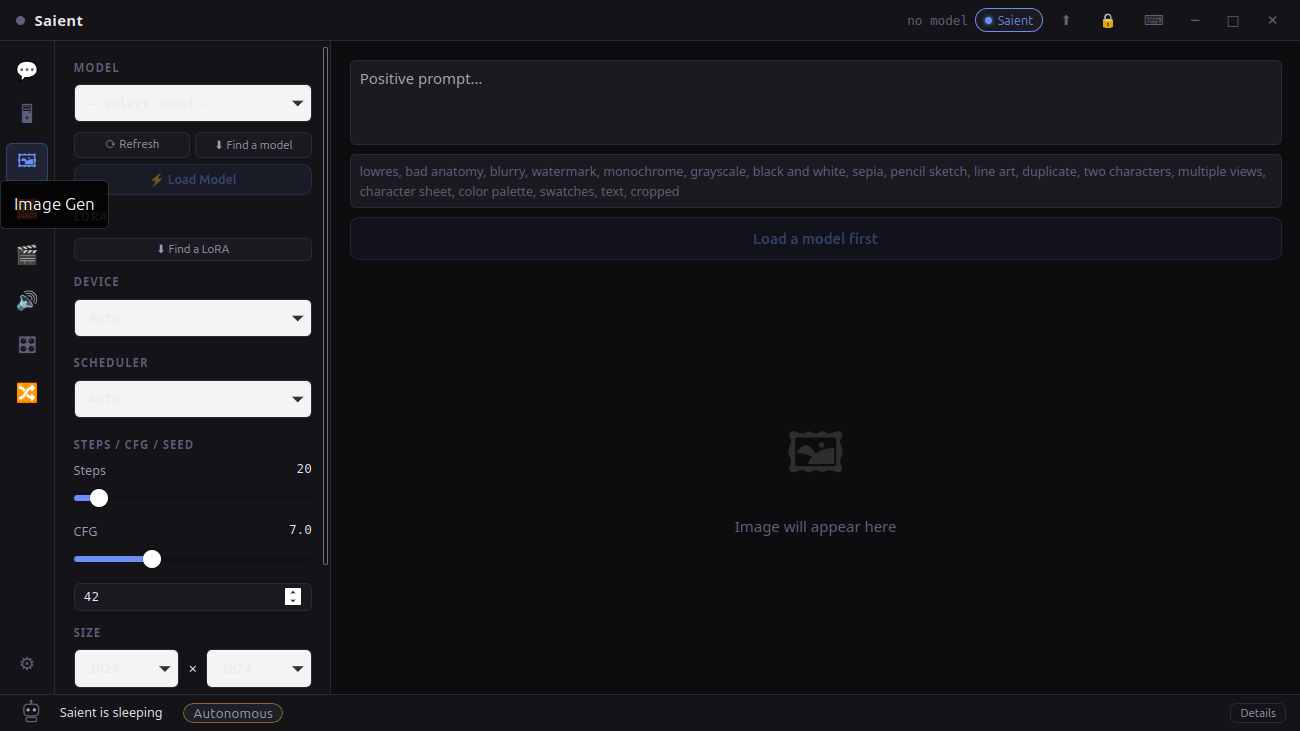
Image generation
Model, LoRA, scheduler, prompt and sampling settings in one dedicated screen.
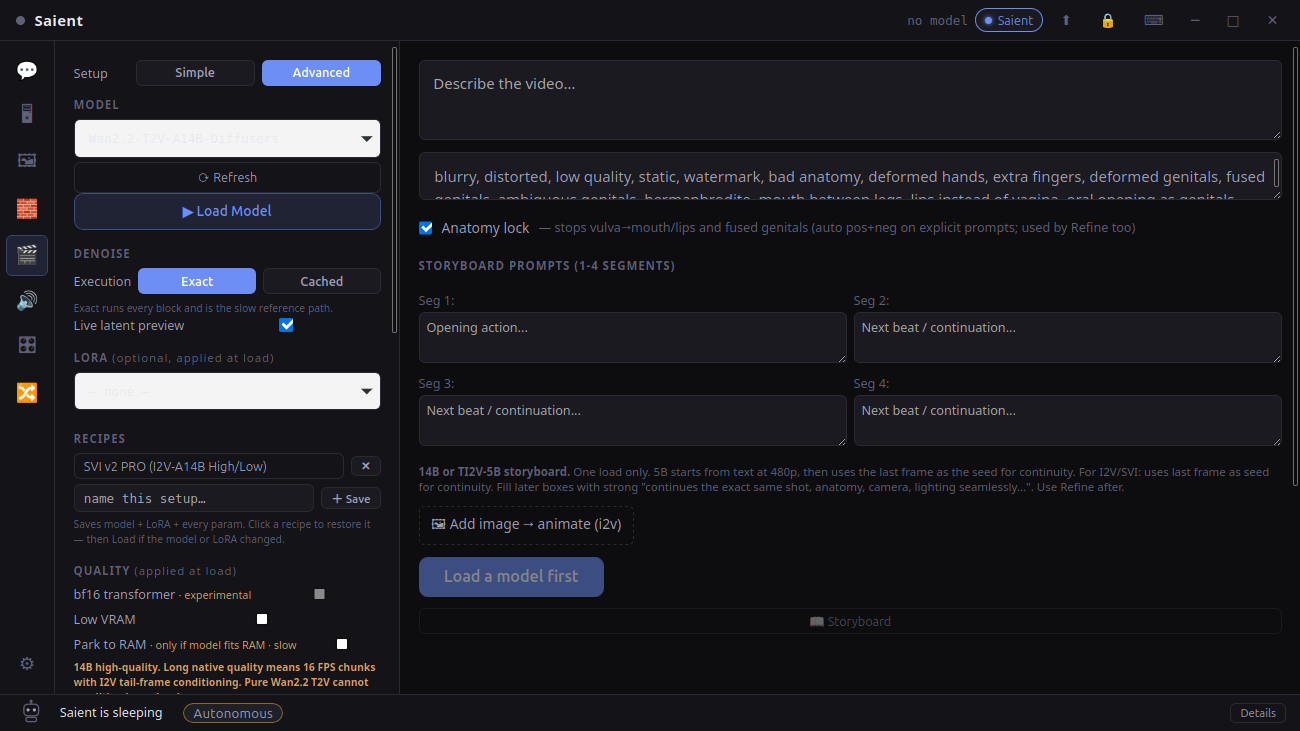
Video generation
Wan/CogVideo model controls, presets, LoRAs, source image, storyboard and memory options.
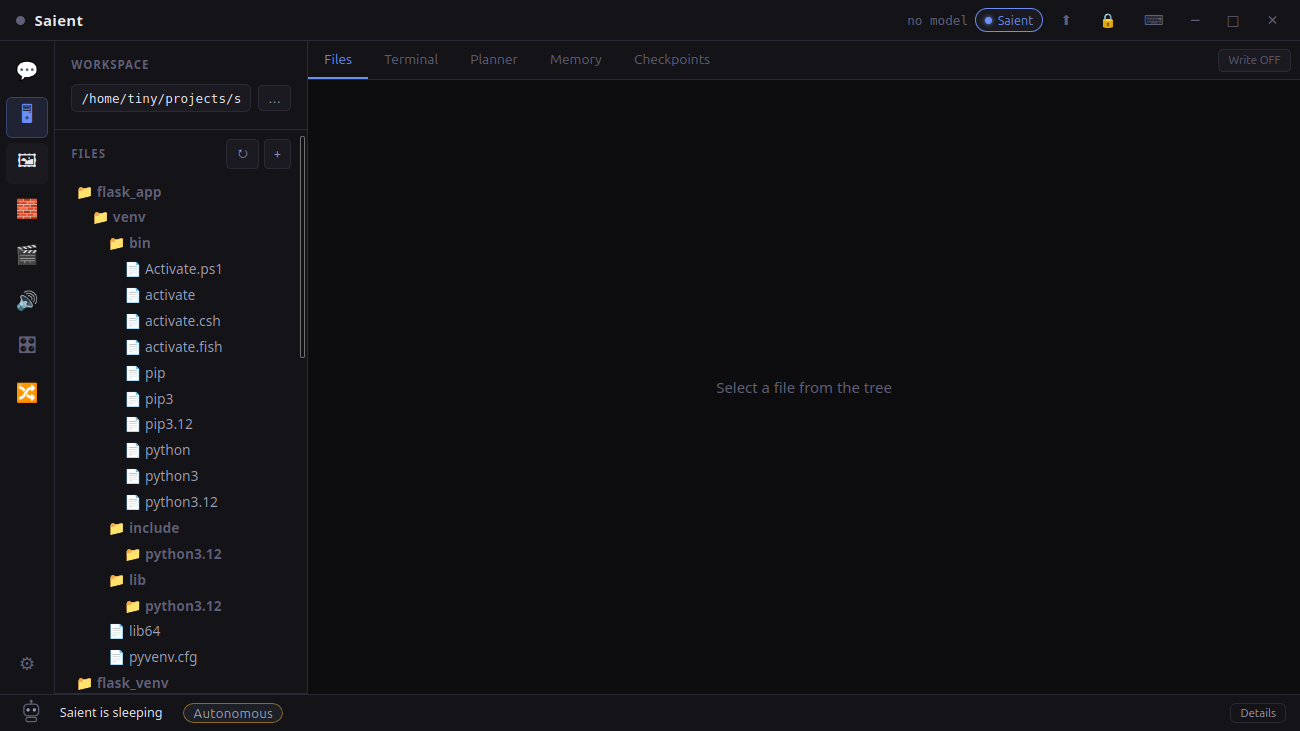
Local agent
A project workspace alongside terminal, planner, memory and checkpoints—the clearest part of Saient that is outside ComfyUI's core creative-graph focus.
Hardware is not one comparison row
Saient's audited no-key package is Debian/Ubuntu amd64 and recommends NVIDIA CUDA. The published Windows x64 test package currently includes the CPU GGUF engine; Windows GPU acceleration and optional Python studios remain unverified. ComfyUI documents more operating systems and accelerator types. For either tool, actual memory depends on the selected model, quantisation, resolution, frame count, context and offload strategy.
What has been checked
The Saient screenshots above were captured from the v1.0.4 application tree used for the current package. Local GGUF inference returned a live test response, and the site includes stored image and video artefacts. Saient's current Merge screen has a confirmed picker defect, and no retained controlled SDXL-LoRA or Kokoro output proof is published yet; the relevant pages say so.
The comparisons use the official repositories for ComfyUI, Fooocus, AUTOMATIC1111 and SwarmUI, checked 12 August 2026—not caricatures or affiliate summaries.
ComfyUI alternative FAQ
Is Saient a ComfyUI alternative?
Yes, for people who prefer dedicated local AI screens over constructing node graphs. Saient combines image generation, video generation, local GGUF chat and a project agent. It is not a drop-in replacement for ComfyUI's graph, custom nodes or broader model ecosystem.
Can I use Saient without building node workflows?
Yes. Saient exposes supported image, video, LLM, agent, TTS, LoRA and model-merge tasks through dedicated screens rather than requiring a node graph for each task.
Is Saient a local AI image generator?
Yes. Saient includes a dedicated local image-generation screen for supported Stable Diffusion routes, including SDXL, with model, LoRA, scheduler, prompt and sampling controls.
Is Saient free and local-first?
Saient is free and its supported inference workflows run locally without a Saient inference API key. Internet access can still be needed to download the application, models or optional components.
Does Saient completely replace ComfyUI?
No. Keep ComfyUI when you need arbitrary node composition, reusable workflow JSON, custom nodes, broad model coverage or hardware routes Saient does not currently support. Choose Saient when its focused screens and integrated LLM and agent workspace better match the work you want to do.
Saient capability guides
Run SDXL locally
Models, setup, hardware and output proof.
WANRun Wan locally
T2V/I2V, model boundaries and video proof.
LLMRun a local LLM
GGUF, memory, local server and live response.
PTYSaient agent
Files, terminal, planning, memory and controls.
LoTrain an SDXL LoRA
Dataset, trainer scope and evidence status.
TTSLocal text-to-speech
Kokoro voices and WAV output route.
Prefer focused screens? Try Saient.
It is free, local-first and does not need a Saient key. Keep ComfyUI when its graph and ecosystem are the better fit; the tools can also coexist on one machine.