Short answer: create one folder containing images and same-name text captions, select an SDXL base in Saient's LoRA screen, review the hyperparameters and start training. The worker freezes the VAE and text encoders and trains LoRA adapters on the UNet attention projections.
Real interface
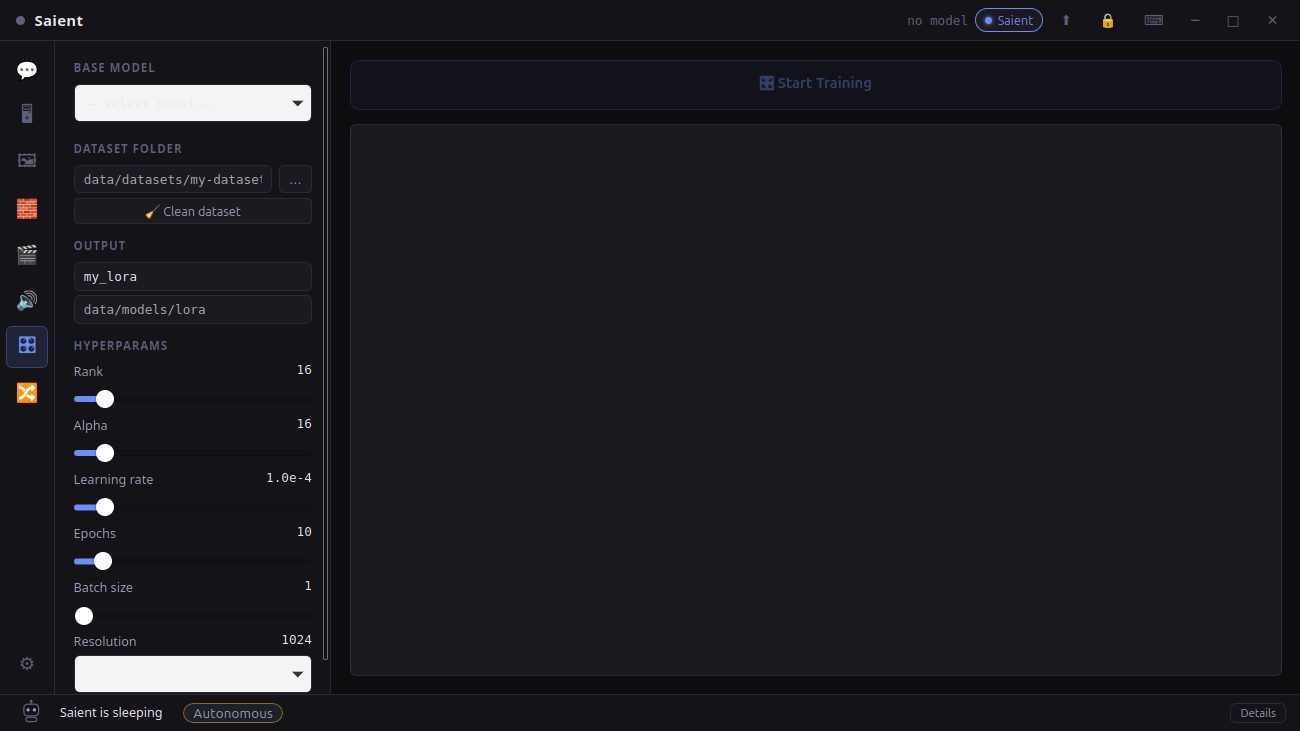
The local LoRA training screen
This screenshot from v1.0.4 shows the base-model selector, dataset folder, cleaner, output path, rank, alpha, learning rate, epochs, batch size and resolution.
Saient LoRA trainer
The controls are captured from the installed application, not reconstructed for this guide.
Dataset and training
Train an SDXL LoRA in five steps
- Collect the images. Supported cleaner inputs are PNG, JPG/JPEG, WebP, BMP and TIFF. The trainer itself currently loads PNG, JPG/JPEG and WebP.
- Add captions. Give each image a same-name
.txtfile. The cleaner creates missing caption files, but an empty caption is not a useful description; review and write them before training. - Run Clean dataset carefully. It deletes junk, unsupported, corrupt and sub-64px files and removes orphan captions. Back up the dataset first because this operation changes the folder.
- Select SDXL and settings. The default UI is rank 16, alpha 16, learning rate
1e-4, 10 epochs, batch size 1 and 1024px. Defaults are starting values, not guaranteed best settings. - Start and monitor. Saient streams step, epoch and loss progress. Stop requests save after the current batch, and completion writes a safetensors adapter.
Exact support
What the current trainer does—and does not do
| Area | Current implementation |
|---|---|
| Base models | SDXL Diffusers directories or compatible SDXL .safetensors/.ckpt checkpoints. A local SDXL base config helps single-file loading. |
| Trainable modules | UNet attention projections to_q, to_k, to_v and to_out.0 through PEFT LoRA. |
| Frozen modules | VAE and both SDXL text encoders. |
| Output | A local safetensors state dictionary containing the LoRA weights. |
| Not claimed | No Flux, SD3, video-LoRA or text-encoder training claim is made for this worker. |
Hardware
Training hardware requirements
- NVIDIA CUDA: strongly recommended. The worker uses FP16 on CUDA and FP32 on CPU.
- CPU: an implemented fallback, but this page does not claim it provides practical SDXL training speed.
- VRAM: depends on resolution, batch size and model. Lowering batch size/resolution reduces memory pressure, but changes the training regime.
- Storage: base model, training images, managed Python environment and output adapter all remain local.
Unknown: a cross-GPU minimum-VRAM and training-time benchmark has not been published for this trainer.
Proof boundary
What is evidenced today
The shipped screen above, Rust process launcher and Python worker establish an implemented end-to-end path: config → local training process → progress events → safetensors save. The repository currently contains downloaded video LoRAs, but no retained output proven to have been produced by this SDXL trainer.
Therefore this page does not invent a “trained in Saient” sample or speed claim. Publishing a checksum, dataset description, settings and before/after generation from a completed controlled run is a follow-up evidence task.
Downloads and documentation
Continue from here
- Download Saient v1.0.9 for Debian/Ubuntu amd64 and choose Full setup.
- Saient setup help and the local SDXL generation guide.
- Saient release repository on GitHub.
- Hugging Face PEFT LoRA documentation for the adapter method used by the worker.
- Understand local checkpoint merging; a checkpoint merge is not the same operation as training a LoRA.
Keep the training images and adapter local.
Saient is free and has no Saient key gate. Base-model and dataset rights remain your responsibility.