Short answer: Saient has a dedicated local Wan worker, not a browser form that sends the job to a cloud API. It loads local model files, quantises and caches large components where configured, manages GPU memory between stages, and writes video output locally.
Real interface
The current Wan video workspace
The v1.0.4 screenshot below shows a locally discovered Wan2.2 T2V-A14B model, exact/cached execution controls, LoRA recipes, low-VRAM controls, storyboard segments and image-to-video input.
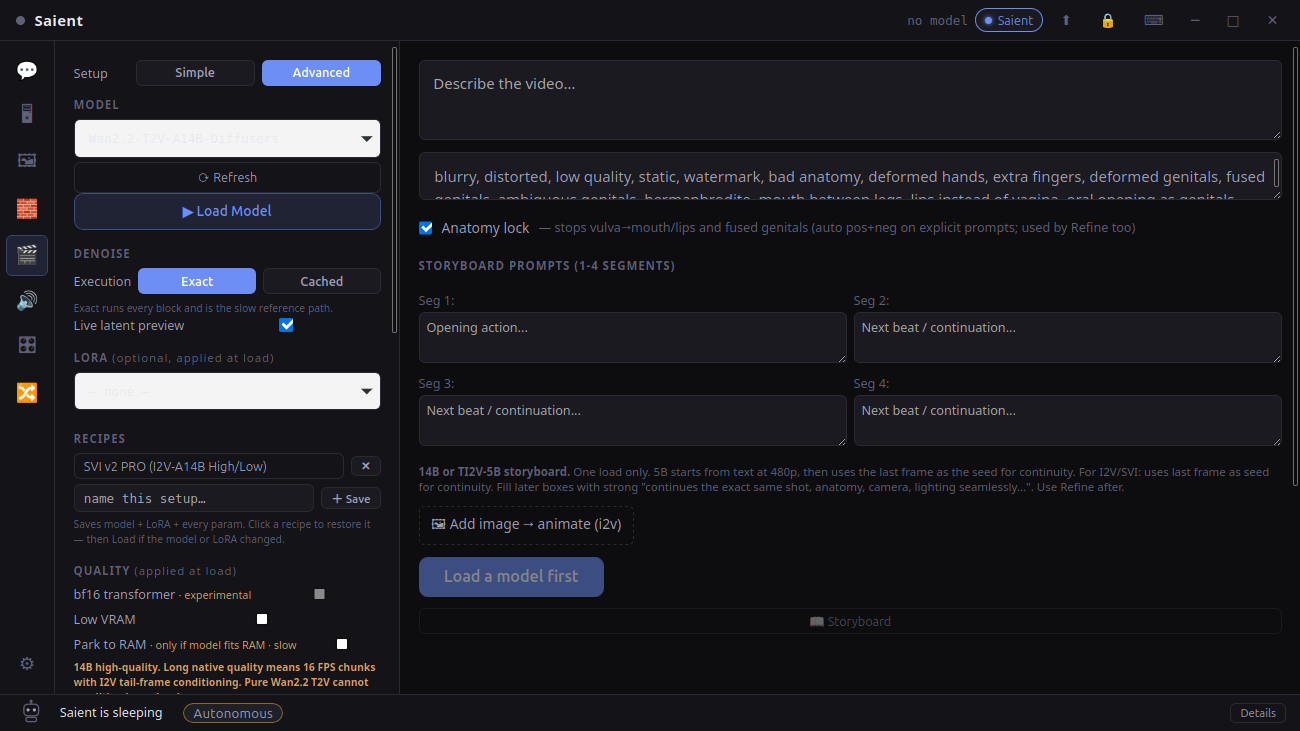
Saient Video Gen, v1.0.4
Captured from the installed application with local Wan model folders present.
Workflow
Run Wan locally in five steps
- Install Full setup. Saient creates a managed Python environment for local video dependencies; it does not require a Saient licence or API key.
- Add a model folder. Place a complete Diffusers-format Wan model in the video models directory, then click Refresh. Model repositories can be very large, so verify storage before download.
- Choose T2V or I2V. Describe one clear shot for text-to-video, or add a source image for image-to-video. Select presets that match the specific Wan family.
- Load once. Saient's worker can build a reusable 4-bit cache for transformer/text-encoder components. The first load can take much longer than later cached loads.
- Generate and inspect. Set resolution, frames, FPS, steps and CFG; generate locally; then use the optional enhancement path if the base result needs interpolation or upscaling.
Compatibility
Which video models are actually implemented?
| Family | Saient route | Status boundary |
|---|---|---|
| Wan2.1 | Dedicated Wan worker; text/image-conditioned routes and local LoRA scanning. | Choose frame counts and dimensions supported by that exact checkpoint. |
| Wan2.2 TI2V-5B | Dedicated presets, tiled VAE decode and a low-VRAM/cache path. | The code documents fitting its tested 5B path on a 16 GB card; that is not a guarantee for every resolution or system. |
| Wan2.2 14B variants | Single-transformer/FastWan and long-video controls exist. | The dual-expert A14B daemon route explicitly rejects an unsafe 16 GB load. Model names that both say “14B” are not interchangeable. |
| CogVideoX-5B I2V | Separate dedicated worker with native 49-frame settings and 4-bit or sequential-offload paths. | It requires an input image in Saient's implemented route. |
| Other detected Diffusers video folders | The scanner recognises several pipeline class names. | Detection alone is not proof of a working generator. Saient currently has dedicated workers for Wan and CogVideoX; other families are unverified here. |
Hardware
Wan hardware requirements
- NVIDIA CUDA GPU: required by the implemented high-memory workers in practical use. A CPU label exists in parts of the loader protocol, but this page does not claim useful CPU-only Wan generation.
- VRAM: varies sharply by model, frames and resolution. Saient contains measured 16 GB paths for selected quantised models and refuses at least one known-unsafe dual-expert 14B configuration on that card size.
- System RAM: large enough for model loading and any selected offload path. Quality/sequential modes trade RAM transfers and time for VRAM.
- Storage: expect tens of gigabytes for large Wan repositories plus reusable quantised caches. Check the source model repository before downloading.
Do not use “Wan requires X GB” as a universal rule. Wan2.1 1.3B, Wan2.2 5B and the various 14B pipelines have materially different requirements.
Proof
A stored MP4 from the Saient video workflow
The interface screenshot proves the current app exposes the local controls. This existing H.264 MP4 is stored with the Saient site as a compact generation example.
Cyberpunk motion example
A short proof artefact, not a claim about every Wan model, prompt or output quality. Open its dedicated watch page.
Documentation and source
Useful next links
Generate video without a hosted inference bill.
Saient itself is free. Third-party model terms still apply, and some model hosts can require an account or token for the download only.